I'm going completely in different direction from the last post but can't resist writing about the MOST essential thing in any Development field i.e. Managing a Project.
Managing a Project Includes:
1) Identifying Requirements
2) Establishing Clear and achievable Objective
3) Balancing the competing demands for quality, scope, time and cost
4) Adapting the specifications, plans and approach to different concerns and expectation of various stakeholders.
Project Managers often talk of a "triple Constraint" - Project Scope, Time and Cost - in managing competing Project requirements. Project Quality is affected by balancing these three factors. High Quality Project deliver the required product, service or result within scope, on time and within budget. The relationship between these factors is such that if any one of the three factor changes atleast one other factor is likely to be affective.
Project Management is accomplished through the application and integration of project management processes of Initiating, Planning, Executing, Monitoring and Controlling and Closing. Apart from 5 process groups, it has been organized into 9 knowledge areas as below:
1) Integration Management : describes the processes and activities that integrates the various elements of project management. It consists of Develop Project Charter, Preliminary scope statement, Project Management Plan, Manage Project Execution, Monitor and Control Project Work.
2) Scope Management : describes the processes involved in ascertaining that the project includes all the work required, to complete the project successfully. It consists of Scope Planning , Definition , Verification and Create Work Breakdown Structure.
3) Time Management : describes the processes concerning the timely completion. It consists of Activity Definition, Sequencing, Resource Estimating, Duration Estimating.
4) Cost Management : describes the processes involved in planning, estimating, budgeting and controlling costs so that the project is completed within approved budget.
5) Quality Management : describes the processes involved in assuring that the project will satisfy the objectives for which it was undertaken.
6) Human Resources Management : describes the processes that organizes and manages the project team. It consists of Human Resource Planning, acquire project team, Develop and Manage Project Team
7) Communication Management : describes the processes concerning the timely and appropriate generation, collection, and storage of project information. It consists of Communications planning, Information Distribution, Performance Reporting and Manage Stakeholders
8) Risk Management : describes the processes concerned with conducting risk management on a project. It consists of Risk Management Planning, Identification, Qualitative and Quantitative Risk Analysis and Risk Monitoring
9) Procure Management : describes the processes that purchase or acquire products, services or results as well as contract management processes
Thursday, November 22, 2007

Friday, October 26, 2007
Web Development
There are two types of Web Development Technologies.
1. Client-Side Technologies
2. Server-Side Technologies
Client-Side Technologies :
XHTML
XHTML is a markup language designed to structure information for presentation as web pages. We write all our XHTML by hand, ensuring that it is clean, valid and of the highest standard. This means that pages have fastest download times possible, are viewable on all browsers, are search engine friendly, and have maximum forward compatibility.
Cascading Style Sheets
Cascading Style Sheets control how web pages are displayed in the browser, and allow the separation of presentation from structure and content. CSS help ensure that web pages are presented in an accessible way to all visitors, over a wide range of media.
JavaScript
JavaScript is a lightweight scripting technology which is used alongside XHTML documents to make websites more interactive.
Server-Side Technologies :
PHP
PHP is a fast, server-side scripting language that is used to create interactive, dynamic web sites. It is particularly well-suited to integrating with a range of databases.
PHP offers several key advantages:
• Cross-platform operability
• Compatibility with a wide variety of databases
• Support for most current web servers
• Communicates with numerous network protocols
• Not limited to HTML output
• Strong text processing capabilities
JSP
Java Server Pages (JSP) is a technology that lets you mix regular static HTML with dynamically-generated HTML. Many Web pages that are built by CGI programs are mostly static, with the dynamic part limited to a few small locations. But most CGI variations, including servlets, make you generate the entire page via your program, even though most of it is always the same.
The advantages of JSP are twofold. First, the dynamic part is written in Java, not Visual Basic or other MS-specific language, so it is more powerful and easier to use. Second, it is portable to other operating systems and non-Microsoft Web servers.
ASP/ASP.NET
ASP.Net is development under the full control of Microsoft Technology Corporation.
ASP.net is the successor of Asp. Which is more powerful and advanced .It has large set of new controls and XML based components, and better user authentication. ASP.NET uses the new ADO.NET tools for database connection.
Ruby
Ruby is known as programmer’s friendly languages. Ruby is seen as a flexible language, since it allows its users to freely alter its parts. Essential parts of Ruby can be removed or redefined. Existing parts can be added upon. Ruby tries not to restrict the coder.
For example, addition is performed with the plus (+) operator. But, if you’d rather use the readable word plus, you could add such a method to Ruby’s built-in Numeric class.
CGI/Perl
Perl is a programming language that can handle input and output from a Web Server, usually through the Common Gateway Interface. It is most commonly used to process information through forms.
XML/XSL
XML is a software and hardware independent markup language designed for describing and transmitting information. It is set to become the most common tool for all data manipulation and data transmission. XSL is a language for defining, transforming and formatting XML documents.
MySQL
MySQL is a fast, open-source Relational Database Management System that uses the popular Structured Query Language (SQL). It is perfect for most websites that need database functionality, and works hand-in-hand with PHP.
PostgreSQL
PostgreSQL is a more sophisticated open-source Relational Database Management System. It is well-suited to sites that require robust database functionality, such as e-commerce sites.
Linux/Apache
Linux is a popular open-source operating system, and Apache is the most widely-used web server on the Internet. Together they provide a fast, extremely reliable, secure platform for web sites.
Window IIS
Internet Information Services (IIS) 6.0 is a powerful Web server that provides a highly reliable, manageable, and scalable Web application infrastructure for all versions of Windows Server 2003. IIS helps organizations increase Web site and application availability while lowering system administration costs. It is available with Windows Operating Systems.
SSL/Secure Servers
Unlike normal web servers, secure servers ensure that information exchanged between the visitor and the web site cannot be viewed by any third parties. A secure server is essential when handling confidential information, such as online credit card transactions or personal medical details. SSL, or Secure Socket Layer, is one method of exchanging data securely.
For more details, visit http://www.globalworldtech.com/services.html
1. Client-Side Technologies
2. Server-Side Technologies
Client-Side Technologies :
XHTML
XHTML is a markup language designed to structure information for presentation as web pages. We write all our XHTML by hand, ensuring that it is clean, valid and of the highest standard. This means that pages have fastest download times possible, are viewable on all browsers, are search engine friendly, and have maximum forward compatibility.
Cascading Style Sheets
Cascading Style Sheets control how web pages are displayed in the browser, and allow the separation of presentation from structure and content. CSS help ensure that web pages are presented in an accessible way to all visitors, over a wide range of media.
JavaScript
JavaScript is a lightweight scripting technology which is used alongside XHTML documents to make websites more interactive.
Server-Side Technologies :
PHP
PHP is a fast, server-side scripting language that is used to create interactive, dynamic web sites. It is particularly well-suited to integrating with a range of databases.
PHP offers several key advantages:
• Cross-platform operability
• Compatibility with a wide variety of databases
• Support for most current web servers
• Communicates with numerous network protocols
• Not limited to HTML output
• Strong text processing capabilities
JSP
Java Server Pages (JSP) is a technology that lets you mix regular static HTML with dynamically-generated HTML. Many Web pages that are built by CGI programs are mostly static, with the dynamic part limited to a few small locations. But most CGI variations, including servlets, make you generate the entire page via your program, even though most of it is always the same.
The advantages of JSP are twofold. First, the dynamic part is written in Java, not Visual Basic or other MS-specific language, so it is more powerful and easier to use. Second, it is portable to other operating systems and non-Microsoft Web servers.
ASP/ASP.NET
ASP.Net is development under the full control of Microsoft Technology Corporation.
ASP.net is the successor of Asp. Which is more powerful and advanced .It has large set of new controls and XML based components, and better user authentication. ASP.NET uses the new ADO.NET tools for database connection.
Ruby
Ruby is known as programmer’s friendly languages. Ruby is seen as a flexible language, since it allows its users to freely alter its parts. Essential parts of Ruby can be removed or redefined. Existing parts can be added upon. Ruby tries not to restrict the coder.
For example, addition is performed with the plus (+) operator. But, if you’d rather use the readable word plus, you could add such a method to Ruby’s built-in Numeric class.
CGI/Perl
Perl is a programming language that can handle input and output from a Web Server, usually through the Common Gateway Interface. It is most commonly used to process information through forms.
XML/XSL
XML is a software and hardware independent markup language designed for describing and transmitting information. It is set to become the most common tool for all data manipulation and data transmission. XSL is a language for defining, transforming and formatting XML documents.
MySQL
MySQL is a fast, open-source Relational Database Management System that uses the popular Structured Query Language (SQL). It is perfect for most websites that need database functionality, and works hand-in-hand with PHP.
PostgreSQL
PostgreSQL is a more sophisticated open-source Relational Database Management System. It is well-suited to sites that require robust database functionality, such as e-commerce sites.
Linux/Apache
Linux is a popular open-source operating system, and Apache is the most widely-used web server on the Internet. Together they provide a fast, extremely reliable, secure platform for web sites.
Window IIS
Internet Information Services (IIS) 6.0 is a powerful Web server that provides a highly reliable, manageable, and scalable Web application infrastructure for all versions of Windows Server 2003. IIS helps organizations increase Web site and application availability while lowering system administration costs. It is available with Windows Operating Systems.
SSL/Secure Servers
Unlike normal web servers, secure servers ensure that information exchanged between the visitor and the web site cannot be viewed by any third parties. A secure server is essential when handling confidential information, such as online credit card transactions or personal medical details. SSL, or Secure Socket Layer, is one method of exchanging data securely.
For more details, visit http://www.globalworldtech.com/services.html
Thursday, October 11, 2007
Web Development
Web development is a broad term for any activities related to developing a web site for the World Wide Web or an intranet. This can include e-commerce business development, web design, web content development, client/server-side coding, and web server configuration.
However, among web professionals, "web development" usually refers only to the non-design aspects of building web sites, e.g. writing markup and coding. Web development can range from developing the simplest static single page of plain text to the most complex web-based internet applications, electronic businesses, or social network services.
Information Processing Systems
Web technologies are used to produce not just simple personal or promotional Web sites containing informative, interesting, or entertaining material for public consumption. Rather, they are becoming important means for supporting the foundational "business processes" of modern organizations -- the underlying operational and management-support functions. The technical infrastructures for supporting these purposes are roughly classified into three types of Web-based systems, termed
- intranets,
- internets, and
- extranets.
1) Intranet : Intranets are private, internal systems to help carry out the day-to-day information processing, management information, and work-flow activities of organizations. Web-based intranets service the standard internal business functions and in doing so impact basic organizational systems such as accounting and financial reporting systems, marketing and sales systems, purchasing and distribution systems, production systems, and human resource systems, among others. In time, Web-based intranets will become the primary technical means through which organizations function internally to carry out their business processes.
2) Internet : Internets are public information systems. They include public sites that provide news, information, and entertainment; electronic commerce sites to market and sell products and services; governmental sites to inform or service the general public; and educational sites to provide local and remote access to education and training. In all sectors of society, public internets are providing goods, services, and information to the public through the World Wide Web and its associated networks and services.
3) Extranet : Extranets are business-to-business (B2B) systems that manage electronic data interchange (EDI) between business enterprises. These systems facilitate the flow of information between organizations -- between a company and its suppliers and between the company and its distributors -- to help coordinate the sequence of purchasing, production, and distribution. Electronic data interchange helps eliminate the paper flow accompanying business transactions by using Web technologies to transfer electronic documents for processing between computers rather than between people. As Web-based systems, EDI applications eliminate the difficulties of communicating information among different hardware and software platforms with inherently different information formats and with different protocols for exchanging information.
For more detail, please visit http://www.globalworldtech.com
Thursday, October 4, 2007
Layout
Layout is the structure of given content for a web page. There are certain things a web designer needs to take into consideration while designing. That are
1. Golden Point-
Is an object on which we are going to focus. When there are too many things in front of you to arrange, choose any one object in your design. That can be anything like.. logo, image, illustration, typography etc. towards which you want people get attracted and then arrange other objects which would complement your golden point.
Remember in any design Golden point or Focal point can be only one. You can not focus on objects more than one. That would confuse your audience.
Positioning the golden point :

Divide your design in 9 parts. Choose any one point shown in above diagram, to position your golden point.
2. Balance:
Symmetrical balance is achieved arranging objects of similar weight to both the sides of the design.
Asymmetrical balance is achieved arranging objects randomly in design considering their weightage.
3. Breathing space-
Breathing space is the most important aspect of any type of design. It is a spacing between any two objects. A design should not look too crowded. Complicated design will make your audience confused. They will get where to find what.
Though we always try to utilize maximum space of our design, every object should get some space to breath. So always try to make very neat and clean designs.
- Golden-point
- Balance- Symmetrical balance, Asymmetrical balance.
- Breathing Space.
1. Golden Point-
Is an object on which we are going to focus. When there are too many things in front of you to arrange, choose any one object in your design. That can be anything like.. logo, image, illustration, typography etc. towards which you want people get attracted and then arrange other objects which would complement your golden point.
Remember in any design Golden point or Focal point can be only one. You can not focus on objects more than one. That would confuse your audience.
Positioning the golden point :
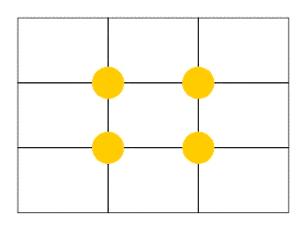
Divide your design in 9 parts. Choose any one point shown in above diagram, to position your golden point.
2. Balance:
Symmetrical balance is achieved arranging objects of similar weight to both the sides of the design.
Asymmetrical balance is achieved arranging objects randomly in design considering their weightage.
3. Breathing space-
Breathing space is the most important aspect of any type of design. It is a spacing between any two objects. A design should not look too crowded. Complicated design will make your audience confused. They will get where to find what.
Though we always try to utilize maximum space of our design, every object should get some space to breath. So always try to make very neat and clean designs.
For more details, please visit http://www.globalworldtech.com/
Sunday, September 23, 2007
In our previous post we explained the areas of web designing. In this post we will elaborate one area that is color.
Color has different names like Shade, Tint, Hue and Chrome.
In olden days people used to make colors using natural elements and these colors were also limited. Now we have many different shades of a single color made by using chemicals and all.
There are two types of colors.
1) Pigment colors- colors that we use for painting on paper, canvas, fabric, glass etc. and for printing purpose.
2) Light colors- These colors come from the ray of light. These colors are invisible to human eye without any medium. ( we can see colors of light through spectrum)
Internet is an electronic media and the colors we see on the screen of our computer or television or mobile are light colors. Electronic media make light colors visible to human eye.
Let’s learn color theory.
Primary colors-

Color has different names like Shade, Tint, Hue and Chrome.
In olden days people used to make colors using natural elements and these colors were also limited. Now we have many different shades of a single color made by using chemicals and all.
There are two types of colors.
1) Pigment colors- colors that we use for painting on paper, canvas, fabric, glass etc. and for printing purpose.
2) Light colors- These colors come from the ray of light. These colors are invisible to human eye without any medium. ( we can see colors of light through spectrum)
Internet is an electronic media and the colors we see on the screen of our computer or television or mobile are light colors. Electronic media make light colors visible to human eye.
Let’s learn color theory.
Primary colors-
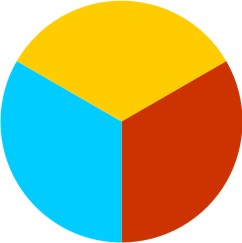
Yellow- Red- Blue – Primary colors are basic colors, that are original colors and are not the mixture of any two colors.
Secondary colors-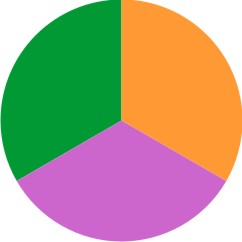
Orange – Violet – Green – These are secondary colors and are the mixture of primary colors e.g.
Yellow + Red = Orange
Red + Blue = Violet
Blue + Yellow = Green
Color-Wheel
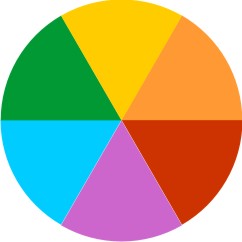
Color- wheel plays very important role in color theory. All the color theories are based on this color wheel.
Color schemes-
Color scheme is a combination of different colors.
Here are some color schemes created considering color wheel containing primary and secondary colors in color theory.
1) Mono chromatic color scheme- Mono means one. Color scheme which contains any single colors and it’s light and dark shades.
2) Achromatic color scheme- Achromatic means without colors. Black and white are not considered as colors in color theory. So black and white color scheme is called Achromatic color scheme.
3) Contrast or Opposite color scheme- This color scheme contains colors that are opposite to each other in color wheel. E.g. Red- Green
4) Analogous color scheme- This color scheme contains colors that neighbouring to each other. E.g Yellow- Orange
It is not like we have to follow these color schemes while designing. But if you are confused with colors or got stuck with any color issue, following these color schemes is the best solution. Alternatively, send us an email with your query.
For more details about us, please visit http://www.globalworldtech.com/
Friday, September 14, 2007
Website Design - Basic Fundamentals
What is a Website?
1) A Web site is a collection of information about a particular topic or subject. A Web page consists of information for which the Web site is developed.
2) Collection of HTML files that reside on a web server and present content and interactive interfaces to the end user in form of Web pages.
Designing of a website/web page starts with concept. But what exactly is concept?
Concept is an Idea, a visual approach through which we communicate with the people who visit our website. Concept is everything, Overall look, content and the structure of the website.
Concept is decided recognizing the Target-Audience. Target audience is the type of people who visit any particular website. e.g.:
After concept the second point that a web designer has to take into consideration is “colors”. Colors play an important role in any design. But use of colors in web industry is the matter of
1) Corporate colors- Grey, black, sky blue, dark blue, light yellow.
2) Masculine colors- Blue, any shade of grey and black, white.
3) Feminine colors- Pink, Lavender, white.
4) Kiddy colors- Bright shade of any color.
5) Foody colors- Green- Yellow – Red.
Third area of web page designing is Layout.
Layout is the structure of the content on web page. Deciding layout is deciding the area of content. Remember the designing rules that we have been taught in college days?
Golden Point- It is the basic rule.
Even if you dont remember, Just take out pencil and paper and scribble out as many layouts as you can for your content and choose the one which is most attractive and applicable for your website.
For more details, please visit http://www.globalworldtech.com
1) A Web site is a collection of information about a particular topic or subject. A Web page consists of information for which the Web site is developed.
2) Collection of HTML files that reside on a web server and present content and interactive interfaces to the end user in form of Web pages.
Designing of a website/web page starts with concept. But what exactly is concept?
Concept is an Idea, a visual approach through which we communicate with the people who visit our website. Concept is everything, Overall look, content and the structure of the website.
Concept is decided recognizing the Target-Audience. Target audience is the type of people who visit any particular website. e.g.:
- Like if we are a software company, Our visitors would be our clients, any other software company or people willing to switch the job. So considering the above points and the interest of our visitors, we would design our website that would appeal to our target audience. The website should have very professional look, highlighting the services of our company, informative and providing the links considering their interests.
- And if we are a brand of Clothing, our target audience would be people from fashion industry and mostly youngsters. So considering our target audience the look of our website MUST be very trendy, interactive, up-market and vibrant. The focus of the website should be products, their information and the price
After concept the second point that a web designer has to take into consideration is “colors”. Colors play an important role in any design. But use of colors in web industry is the matter of
- trend, e.g. in the early stage of web designing, designers used to use light and soothing colors,
- and subject of the website
1) Corporate colors- Grey, black, sky blue, dark blue, light yellow.
2) Masculine colors- Blue, any shade of grey and black, white.
3) Feminine colors- Pink, Lavender, white.
4) Kiddy colors- Bright shade of any color.
5) Foody colors- Green- Yellow – Red.
Third area of web page designing is Layout.
Layout is the structure of the content on web page. Deciding layout is deciding the area of content. Remember the designing rules that we have been taught in college days?
Golden Point- It is the basic rule.
Even if you dont remember, Just take out pencil and paper and scribble out as many layouts as you can for your content and choose the one which is most attractive and applicable for your website.
For more details, please visit http://www.globalworldtech.com
Website Design - Basic fundamentals
What is a Website?
1) A Web site is a collection of information about a particular topic or subject. A Web page consists of information for which the Web site is developed.
2) Collection of HTML files that reside on a web server and present content and interactive interfaces to the end user in form of Web pages.
Designing of a website/web page starts with concept. But what exactly is concept?
Concept is an Idea, a visual approach through which we communicate with the people who visit our website. Concept is everything, Overall look, content and the structure of the website.
Concept is decided recognizing the Target-Audience. Target audience is the type of people who visit any particular website. e.g.:
1) Like if we are a software company, Our visitors would be our clients, any other software company or people willing to switch the job. So considering the above points and the interest of our visitors, we would design our website that would appeal to our target audience. The website should have very professional look, highlighting the services of our company, informative and providing the links considering their interests.
2) And if we are a brand of Clothing, our target audience would be people from fashion industry and mostly youngsters. So considering our target audience the look of our website MUST be very trendy, interactive, up-market and vibrant. The focus of the website should be products, their information and the price.
That is how the concept of website depends on the subject.
After concept the second point that a web designer has to take into consideration is “colors”. Colors play an important role in any design. But use of colors in web industry is the matter of
trend, e.g. in the early stage of web designing, designers used to use light and soothing colors,
and subject of the website.
Colors create the mood of the website. We all know the significance of colors and which color represents what, Following are the sets of the colors- most commonly used-
1) Corporate colors- Grey, black, sky blue, dark blue, light yellow.
2) Masculine colors- Blue, any shade of grey and black, white.
3) Feminine colors- Pink, Lavender, white.
4) Kiddy colors- Bright shade of any color.
5) Foody colors- Green- Yellow – Red.
Third area of web page designing is Layout.
Layout is the structure of the content on web page. Deciding layout is deciding the area of content. Remember the designing rules that we have been taught in college days?
Golden Point- It is the basic rule.
Even if you dont remember, Just take out pencil and paper and scribble out as many layouts as you can for your content and choose the one which is most attractive and applicable for your website.
For more details, please visit http://www.globalworldtech.com
1) A Web site is a collection of information about a particular topic or subject. A Web page consists of information for which the Web site is developed.
2) Collection of HTML files that reside on a web server and present content and interactive interfaces to the end user in form of Web pages.
Designing of a website/web page starts with concept. But what exactly is concept?
Concept is an Idea, a visual approach through which we communicate with the people who visit our website. Concept is everything, Overall look, content and the structure of the website.
Concept is decided recognizing the Target-Audience. Target audience is the type of people who visit any particular website. e.g.:
1) Like if we are a software company, Our visitors would be our clients, any other software company or people willing to switch the job. So considering the above points and the interest of our visitors, we would design our website that would appeal to our target audience. The website should have very professional look, highlighting the services of our company, informative and providing the links considering their interests.
2) And if we are a brand of Clothing, our target audience would be people from fashion industry and mostly youngsters. So considering our target audience the look of our website MUST be very trendy, interactive, up-market and vibrant. The focus of the website should be products, their information and the price.
That is how the concept of website depends on the subject.
After concept the second point that a web designer has to take into consideration is “colors”. Colors play an important role in any design. But use of colors in web industry is the matter of
trend, e.g. in the early stage of web designing, designers used to use light and soothing colors,
and subject of the website.
Colors create the mood of the website. We all know the significance of colors and which color represents what, Following are the sets of the colors- most commonly used-
1) Corporate colors- Grey, black, sky blue, dark blue, light yellow.
2) Masculine colors- Blue, any shade of grey and black, white.
3) Feminine colors- Pink, Lavender, white.
4) Kiddy colors- Bright shade of any color.
5) Foody colors- Green- Yellow – Red.
Third area of web page designing is Layout.
Layout is the structure of the content on web page. Deciding layout is deciding the area of content. Remember the designing rules that we have been taught in college days?
Golden Point- It is the basic rule.
Even if you dont remember, Just take out pencil and paper and scribble out as many layouts as you can for your content and choose the one which is most attractive and applicable for your website.
For more details, please visit http://www.globalworldtech.com
Tuesday, May 1, 2007
Community Site
GlobalWorldTech presents community site for all Sannyasins in the world. A website that provides a virtual community for people interested in a particular subject or just to "hang out" together. Members communicate by instant message, guest books, private messages, groups and blogs and the service typically provides a way for members to contact friends of other members. This site is for group of people who use the internet to communicate with each other about anything and everything.
Feel free to visit and join (it is FREE) http://www.sannayasbusiness.com
To get in touch with us for your requirement, visit http://www.globalworldtech.com
Feel free to visit and join (it is FREE) http://www.sannayasbusiness.com
To get in touch with us for your requirement, visit http://www.globalworldtech.com
Thursday, February 1, 2007
GlobalWorldTech -> Open Source Customization
Open source - is most commonly applied to the source code of software that is made available to the general public with either relaxed or non-existent intellectual property restrictions. This allows users to create user-generated software content through either incremental individual effort, or collaboration.
Some consider open source as one of various possible design approaches, while others consider it a critical strategic element of their operations. The term open source gained popularity with the rise of the Internet and its enabling of diverse production models, communication paths, and interactive communities. [Source : wikipedia.org ]
Open Source software provides an opportunity for anyone to use and to learn the software, join and share his views / ideas to other community members and if possible participate/contribute to see the software grow and succeed.
GlobalWorldTech recently customized OSCommerce. osCommerce is an Open Source based online shop e-commerce solution that is available for free under the GNU General Public License. It features a rich set of out-of-the-box online shopping cart functionality that contains both a catalog frontend and an administration tool backend. osCommerce combines Open Source solutions to provide a free and open e-commerce platform, which includes the powerful PHP web scripting language and the fast MySQL database server.
Other open source software customized by GlobalWorldTech are - PhpBB and Joomla
Please let us know if you like any open source software and want to customize it, we will be happy to do that for you.
For more details, please visit http://www.globalworldtech.com
Some consider open source as one of various possible design approaches, while others consider it a critical strategic element of their operations. The term open source gained popularity with the rise of the Internet and its enabling of diverse production models, communication paths, and interactive communities. [Source : wikipedia.org ]
Open Source software provides an opportunity for anyone to use and to learn the software, join and share his views / ideas to other community members and if possible participate/contribute to see the software grow and succeed.
GlobalWorldTech recently customized OSCommerce. osCommerce is an Open Source based online shop e-commerce solution that is available for free under the GNU General Public License. It features a rich set of out-of-the-box online shopping cart functionality that contains both a catalog frontend and an administration tool backend. osCommerce combines Open Source solutions to provide a free and open e-commerce platform, which includes the powerful PHP web scripting language and the fast MySQL database server.
Other open source software customized by GlobalWorldTech are - PhpBB and Joomla
Please let us know if you like any open source software and want to customize it, we will be happy to do that for you.
For more details, please visit http://www.globalworldtech.com
Sunday, January 14, 2007
Thursday, January 11, 2007
PHP Search Engine Optimization
PHP Search Engine Optimization
You want to convince search engine spiders to crawl your pages frequently. You need to put in keyword-rich, dynamic content to help convince the spiders to check your pages regularly. Unfortunately, many spiders trip over dynamic pages. How do you fix this problem? Use PHP to give your dynamic pages static-looking URLs. Roger Stringer explains how to do it.
PHP is a useful language, used by many all over the Web. But it has one failing. By its nature, it is not search engine friendly. In fact, it's the exact opposite. But with some clever tweaking, we can make PHP a powerful tool in the quest for search engine dominance.
Proper search engine optimization can make PHP even look like a different script. You could make it look like an HTML file or several HTML files, one for each article on your site.
Speed
Speed is a major factor for websites. If a search engine spider follows a link on your site and is forced to wait too long for the server to process the PHP code behind that page, it may ignore your page and move on.
The biggest slowdowns in a PHP script are typically the database and loop code. Try to avoid making any SELECT * calls; instead, name all the columns you want to retrieve. Using SELECT * on a table that contains 10 fields when you only want to use one or two fields is a waste of valuable resources.
To optimize loops, try to use duplicated code instead of loops that don't repeat very many times. Additionally, use as many static values, such as count($array) values, inside the loop as you can, generating their values before they loop once.
The first issue to deal with is PHP's tendency to add session ID numbers to links.
This is caused by having the "enable-trans-sid" option turned on, and it creates links with an additional, long, nonsense-looking GET variable. In addition to making the links clunky, it gives spiders different URLs with the same content, which makes them less likely to treat the pages individually. They might not even index them at all.
An example of this can be seen here:
http://www.mysite.com/index.php?PHPSESSID=b5dbe844a2c69fadc58614eb9a94b0 ce
Kind of ugly right? Now imagine being a search engine spider and seeing that long number change every time you look at the page. Not a pretty picture.
A quick way to fix this is to disable the trans-id feature, if you have access, in php.ini by setting "session.use_trans_sid" to false. If you don’t have access to change php.ini, you can add this line to the .htaccess file in your root directory:
php_flag session.use_trans_sid off
This will make the Session IDs disappear from the URL.
Friendly URLs
A major goal in optimizing your PHP pages for search engines is to make them look and act like static pages. If you have a large site you can use Apache to fake static-looking URLs, or, with a smaller site, you can simply keep your GET variables to a useful minimum. In either case, however, never allow a spider to see links with different URLs to the same content. If the URL is different, the page should be, too.
One of the major problems most webmasters have with getting their dynamic pages to index is URL cleanliness. Since many dynamic pages are created with GET variables, lots of pages have URLs that look like:
Page.php?var=abc&var2=def&var3=ghi
Most of the search engines will be able to follow this link, because it has three or fewer GET variables (a good rule of thumb is to keep the number of GET variables passed in the URL to less than three), but any more than three variables will cause you to run into problems. Try using less GET variables, and make them more relevant. Rather that useless id numbers, use titles and other keyword rich bits of text. This is an example of a better URL:
Page.php?var=category&var2=topic
If the page requires more variables, you may want to consider combining the variables by delimiting them with a hyphen or another unused character, and then splitting the variable in the target page.
Next, we'll cover two methods of making your dynamic URLs more friendly. The first is mod_rewrite:
It's very important that you plan how to rewrite you URLs, because you don't want to go back and change the links over and over again. Once you have a good steady map of how to rewrite your links, you can go ahead and modify a test script to see if everything worked. If your links work properly then you'll be able to move on and modify all existing links. Let's take a look at this example below:
http://example.com/index.php?act=articles&id=21&page=0
That can turn into:
mod_rewrite URL: http://example.com/articles/21/0.html
Doesn't that look much friendlier?
Once you have planned your URL rewriting, you are ready to set up your .htaccess file, which maps out what to do with each URL. Here's an example of what to put in your .htaccess file. I'll explain how this works below.
RewriteEngine On
RewriteRule ^(.*)/(.*)/(.*).html /index.php?act=$1&id=$2&page=$3
In the example above we have two lines. The first line RewriteEngine On starts the mod_rewrite engine.
The second line does all the work.
RewriteRule ^(.*)/(.*)/(.*).html /index.php?act=$1&id=$2&page=$3
Here you are starting a RewriteRule.
RewriteRule ^(.*)/(.*)/(.*).html /index.php?act=$1&id=$2&page=$3
This is the start of a regex that allows you to create wildcards for the URL that your friendly URL. This allows us to use whatever we want between the (.*) and compare them to the second part of this rewrite rule.
RewriteRule ^(.*)/(.*)/(.*).html /index.php?act=$1&id=$2&page=$3
This is the final part of the rewrite rule that tells us how to map the friendly URL in part two of the RewriteRule to the actual URL that our script was written for. mod_rewrite will translate part one to part 2 automatically.
This works by using regex. The first (.*) will be $1 and the second (.*) becomes $2 in the translation. You can do this as many times as you want for your URL.
Say for example we had this URL: articles/21/0.html.
We'll be matching up /index.php?act=articles&id=31&page=0 by using mod_rewrite!
Believe it or not, that's all that's really to mod_rewriting!
You can really get carried away with this by adding category titles to some of your rewrite URLs to make them even more search engine friendly. All you have to do is create another regex and don't use that variable in your translation.
Another way to make dynamic URLs appear static is by using Apache’s ForceType method in combination with a PHP command to interpret URLs like: www.example.com/articles/21/0.html as referring to a page called "articles" which is executed as a PHP script. This can be accomplished by inserting a line like this into the .htaccess file in the root of your web documents directory:
ForceType application/x-httpd-php
Now create a file called "articles":
$nav = $_SERVER["REQUEST_URI"];
$script = $_SERVER["SCRIPT_NAME"];
$nav = ereg_replace("^$script", "", $nav);
$nav = str_replace(".html", "", $nav);
$vars = explode("/", $nav);
$article = $vars[1];
$page = $vars[2];
require("/index.php?act=articles&id=".$article."&page=".$page);
?>
It works in a similar way as the mod_rewrite example does, but with a little more work.
Advantages
One big advantage to using dynamic pages as opposed to static pages is the ability to create content that is constantly changing and updated in real time. You can use the tricks above, combined with RSS feeds from other sites and other automatically “fresh” content to boost your ranks in Google and many other search engines.
Another advantage to using PHP is that you can make simple modifications to many scripts to create relevant page titles. Since this is the most important factor in SEO, special attention should be given to creating title tags that accurately reflect the page’s current content. Any HTML templates that are used in PHP pages can be altered to contain this line:
With this, $page_title can be set to a keyword rich text describing the page. Title text is also important in improving the click-through from SERP’s, so be sure that the title tags doesn’t read like spam, but more like a human created title.
Conclusion
Mod_rewrite and ForceType can be powerful tools for any webmaster to add to their arsenal when dealing with PHP. Which methods you want to use are up to you. I’ve employed both in my development for different purposes and they both serve me well.
Full article here
PHP Search Engine Optimization
You want to convince search engine spiders to crawl your pages frequently. You need to put in keyword-rich, dynamic content to help convince the spiders to check your pages regularly. Unfortunately, many spiders trip over dynamic pages. How do you fix this problem? Use PHP to give your dynamic pages static-looking URLs. Roger Stringer explains how to do it.
PHP is a useful language, used by many all over the Web. But it has one failing. By its nature, it is not search engine friendly. In fact, it's the exact opposite. But with some clever tweaking, we can make PHP a powerful tool in the quest for search engine dominance.
Proper search engine optimization can make PHP even look like a different script. You could make it look like an HTML file or several HTML files, one for each article on your site.
Speed
Speed is a major factor for websites. If a search engine spider follows a link on your site and is forced to wait too long for the server to process the PHP code behind that page, it may ignore your page and move on.
The biggest slowdowns in a PHP script are typically the database and loop code. Try to avoid making any SELECT * calls; instead, name all the columns you want to retrieve. Using SELECT * on a table that contains 10 fields when you only want to use one or two fields is a waste of valuable resources.
To optimize loops, try to use duplicated code instead of loops that don't repeat very many times. Additionally, use as many static values, such as count($array) values, inside the loop as you can, generating their values before they loop once.
The first issue to deal with is PHP's tendency to add session ID numbers to links.
This is caused by having the "enable-trans-sid" option turned on, and it creates links with an additional, long, nonsense-looking GET variable. In addition to making the links clunky, it gives spiders different URLs with the same content, which makes them less likely to treat the pages individually. They might not even index them at all.
An example of this can be seen here:
http://www.mysite.com/index.php?PHPSESSID=b5dbe844a2c69fadc58614eb9a94b0 ce
Kind of ugly right? Now imagine being a search engine spider and seeing that long number change every time you look at the page. Not a pretty picture.
A quick way to fix this is to disable the trans-id feature, if you have access, in php.ini by setting "session.use_trans_sid" to false. If you don’t have access to change php.ini, you can add this line to the .htaccess file in your root directory:
php_flag session.use_trans_sid off
This will make the Session IDs disappear from the URL.
Friendly URLs
A major goal in optimizing your PHP pages for search engines is to make them look and act like static pages. If you have a large site you can use Apache to fake static-looking URLs, or, with a smaller site, you can simply keep your GET variables to a useful minimum. In either case, however, never allow a spider to see links with different URLs to the same content. If the URL is different, the page should be, too.
One of the major problems most webmasters have with getting their dynamic pages to index is URL cleanliness. Since many dynamic pages are created with GET variables, lots of pages have URLs that look like:
Page.php?var=abc&var2=def&var3=ghi
Most of the search engines will be able to follow this link, because it has three or fewer GET variables (a good rule of thumb is to keep the number of GET variables passed in the URL to less than three), but any more than three variables will cause you to run into problems. Try using less GET variables, and make them more relevant. Rather that useless id numbers, use titles and other keyword rich bits of text. This is an example of a better URL:
Page.php?var=category&var2=topic
If the page requires more variables, you may want to consider combining the variables by delimiting them with a hyphen or another unused character, and then splitting the variable in the target page.
Next, we'll cover two methods of making your dynamic URLs more friendly. The first is mod_rewrite:
It's very important that you plan how to rewrite you URLs, because you don't want to go back and change the links over and over again. Once you have a good steady map of how to rewrite your links, you can go ahead and modify a test script to see if everything worked. If your links work properly then you'll be able to move on and modify all existing links. Let's take a look at this example below:
http://example.com/index.php?act=articles&id=21&page=0
That can turn into:
mod_rewrite URL: http://example.com/articles/21/0.html
Doesn't that look much friendlier?
Once you have planned your URL rewriting, you are ready to set up your .htaccess file, which maps out what to do with each URL. Here's an example of what to put in your .htaccess file. I'll explain how this works below.
RewriteEngine On
RewriteRule ^(.*)/(.*)/(.*).html /index.php?act=$1&id=$2&page=$3
In the example above we have two lines. The first line RewriteEngine On starts the mod_rewrite engine.
The second line does all the work.
RewriteRule ^(.*)/(.*)/(.*).html /index.php?act=$1&id=$2&page=$3
Here you are starting a RewriteRule.
RewriteRule ^(.*)/(.*)/(.*).html /index.php?act=$1&id=$2&page=$3
This is the start of a regex that allows you to create wildcards for the URL that your friendly URL. This allows us to use whatever we want between the (.*) and compare them to the second part of this rewrite rule.
RewriteRule ^(.*)/(.*)/(.*).html /index.php?act=$1&id=$2&page=$3
This is the final part of the rewrite rule that tells us how to map the friendly URL in part two of the RewriteRule to the actual URL that our script was written for. mod_rewrite will translate part one to part 2 automatically.
This works by using regex. The first (.*) will be $1 and the second (.*) becomes $2 in the translation. You can do this as many times as you want for your URL.
Say for example we had this URL: articles/21/0.html.
We'll be matching up /index.php?act=articles&id=31&page=0 by using mod_rewrite!
Believe it or not, that's all that's really to mod_rewriting!
You can really get carried away with this by adding category titles to some of your rewrite URLs to make them even more search engine friendly. All you have to do is create another regex and don't use that variable in your translation.
Another way to make dynamic URLs appear static is by using Apache’s ForceType method in combination with a PHP command to interpret URLs like: www.example.com/articles/21/0.html as referring to a page called "articles" which is executed as a PHP script. This can be accomplished by inserting a line like this into the .htaccess file in the root of your web documents directory:
ForceType application/x-httpd-php
Now create a file called "articles":
$nav = $_SERVER["REQUEST_URI"];
$script = $_SERVER["SCRIPT_NAME"];
$nav = ereg_replace("^$script", "", $nav);
$nav = str_replace(".html", "", $nav);
$vars = explode("/", $nav);
$article = $vars[1];
$page = $vars[2];
require("/index.php?act=articles&id=".$article."&page=".$page);
?>
It works in a similar way as the mod_rewrite example does, but with a little more work.
Advantages
One big advantage to using dynamic pages as opposed to static pages is the ability to create content that is constantly changing and updated in real time. You can use the tricks above, combined with RSS feeds from other sites and other automatically “fresh” content to boost your ranks in Google and many other search engines.
Another advantage to using PHP is that you can make simple modifications to many scripts to create relevant page titles. Since this is the most important factor in SEO, special attention should be given to creating title tags that accurately reflect the page’s current content. Any HTML templates that are used in PHP pages can be altered to contain this line:
With this, $page_title can be set to a keyword rich text describing the page. Title text is also important in improving the click-through from SERP’s, so be sure that the title tags doesn’t read like spam, but more like a human created title.
Conclusion
Mod_rewrite and ForceType can be powerful tools for any webmaster to add to their arsenal when dealing with PHP. Which methods you want to use are up to you. I’ve employed both in my development for different purposes and they both serve me well.
Full article here
PHP Search Engine Optimization
Tuesday, January 2, 2007
GlobalWorldTech
GlobalWorldTech (GWT) is a software development company based in Pune, India, one of India's High-Tech centers. Its Leadership Team is international, with senior members based in the US, Europe, Australia and Japan, as well as India.
Our specialties are Website and Software development, Web Portals, Customized Solutions, and support services for the corporate, organizational and small business market. We have earned an excellent record of successful projects working in environments where specs change, deadlines and goals move.
GWT websites are designed to meet the unique requirements of each organization to ensure a return of the client's investment. We offer all types of websites, including e-commerce and Business-to-Business sites. GWT has the ability to implement a well thought out business site to help your organization take advantage of the area that will have the biggest impact on your business. According to the Gartner Group, e-business or Business-to-Business (B2B) e-commerce has grown from US $433 billion in 2000, to over US $8.5 trillion in 2005.
GWT's key differentiator is that we are very experienced in the fast paced world of internet and software application development. In this world of rapid technology change, we use the most advanced technologies, making your site easy to find and dynamic enough to warrant repeat customer visits. We use innovation without forgetting sound technology practices. We believe that website quality and performance are keys to our success as well as our client's success.
While our main business focus is internet-based business and organizational applications, we also have an extensive background in database-driven extranet and client-server applications. A fully integrated network infrastructure allows us to deliver a full range of business services to our clients. In support of our primary services noted above, we also offer a suite of integrated support services covering the full lifecycle of software development: quality assurance / testing, support and help desk.
GlobalWorldTech (GWT) aims to provide excellent software development services utilizing robust, scalable, and cost-effective solutions. Our team of top class professionals offers proven expertise, ensuring the quality and reliability of the products we develop for you. We emphasize meeting the unique business needs of each of our customers.
GWT offers the following high quality and budget-enhancing software services:
- Software Development
- Web Development
- E-commerce Solutions
- Web Content Editing
- IT Consulting
- System Architecture
- Localization of Software
- System Administration
- Quality Assurance and Testing
- Customer and User Helpdesk Support
Utilizing GWT as your software provider, you will profit by the following benefits:
- Up to 70% cost reduction on software development and maintenance
- Access to a pool of IT professionals with extensive skill sets and experience
- Use of refined software development and Quality Assurance/Test processes
- Freedom to redirect your staff to focus on your core business
- Eliminate 7 x 24 personnel availability for System Administration and Customer or User HelpDesk support
Contact us at GWT for a free, no obligation evaluation of your current IT processes. We would be pleased to meet with you and discuss efficient software solutions.
Subscribe to:
Posts (Atom)